
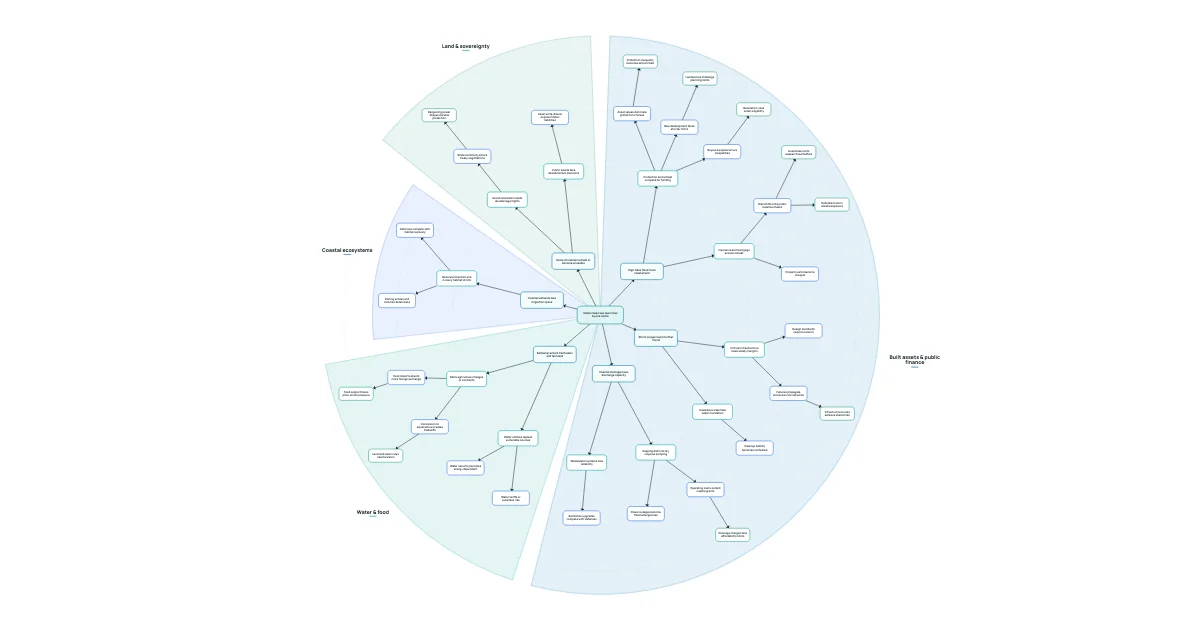
What is a futures wheel?
Developed by futurist Jerome C. Glenn in 1971, the futures wheel is a method for exploring the potential consequences of change.
The method begins with an event, decision, or trend placed at the center of a map. Its possible direct consequences form the first level. Each of those consequences may give rise to further effects, which form subsequent levels.
By working through these relationships, we can consider consequences that might otherwise escape our attention. A futures wheel represents possibilities for discussion and investigation rather than predictions of what will happen.
Glenn, J. C. (2009). The futures wheel. In J. C. Glenn & T. J. Gordon (Eds.), Futures research methodology—Version 3.0. The Millennium Project.
How to create a futures wheel
- Identify a change
Choose a decision, event, or emerging trend that you want to examine. Place it at the center of your futures wheel.
- Consider its immediate consequences
Ask what could happen as a direct result of the change. Add each possibility as a first-order consequence.
- Explore subsequent consequences
Examine each consequence in turn. What could happen as a result of it? Continue developing branches where further exploration seems useful.
- Examine your findings
Identify potential opportunities, risks, assumptions, and questions that require further investigation. Add notes and sources to document your reasoning.
- Discuss and share your wheel
Invite others to consider the possibilities you have identified. Present, publish, or export your futures wheel and revise it as your understanding develops.
Why use KnowMapped for futures wheels?
| Capability | Description |
|---|---|
| Automatic radial layout | Concentrate on the consequences while KnowMapped arranges the wheel. |
| Different branch depths | Explore some consequences in greater detail than others. |
| Domains | Organize related first-order effects into categories such as economic, social, or environmental effects. |
| Notes and references | Document the reasoning and evidence behind possible consequences. |
| Interactive publishing | Let readers explore the wheel themselves. |
| Collaboration | Develop futures wheels with colleagues using Professional. |
| Exports | Include wheels in research reports, presentations, and workshop materials. |
Frequently asked questions
Do I have to draw and arrange the wheel myself?
KnowMapped arranges the wheel automatically as you add consequences. You can develop branches to different depths and group related effects into domains, such as economic, social, or environmental consequences.
Is the futures wheel maker free to use?
A free account includes creating, editing, presenting, publishing, and exporting futures wheels, with up to 25 active maps. Building a wheel yourself does not require generation credits or a subscription.
How can I use it with a workshop group?
Present the wheel and add consequences as participants suggest them, with notes and references to record their reasoning. For participants to edit together in real time, the map must be owned by a Professional account.
Can I put the finished wheel in a report or presentation?
You can export it as SVG, PDF, PNG, or JPEG. You can also publish an interactive version that readers can explore through a link or a website embed. Standard exports and publishing are included with Free; Professional adds watermark-free output.
How can I use AI to help build a futures wheel?
With Professional, you can connect a compatible AI assistant through MCP and ask it to create or develop a futures wheel. Creating a new map through MCP uses one credit; reading and editing an existing map use none. You can review the suggestions and continue editing the wheel yourself.
Will the wheel tell me which consequences are most likely?
It shows possible consequences and the connections between them, but does not calculate their likelihood. Use the wheel to discuss what might happen and identify possibilities that need further investigation.